This weekend I worked on TWO interesting experiments related to carrying memories/context between, and continuing work across, multiple agents and platforms (e.g. Claude, Grok Bot, OpenClaw, ChatGPT Dots, etc.)
The first is a “shared brain” and the second is a “shared chat” for agents. Here’s how I set them up.
EXPERIMENT 1: THE BRAIN
This is especially useful if you find yourself forgetting where you had a chat or created something OR if you want to continue working on a project that you started somewhere else but don’t want to have to start from scratch. Having a shared brain removes the need to tell every new session about the project’s current status, how to approach the work, etc.
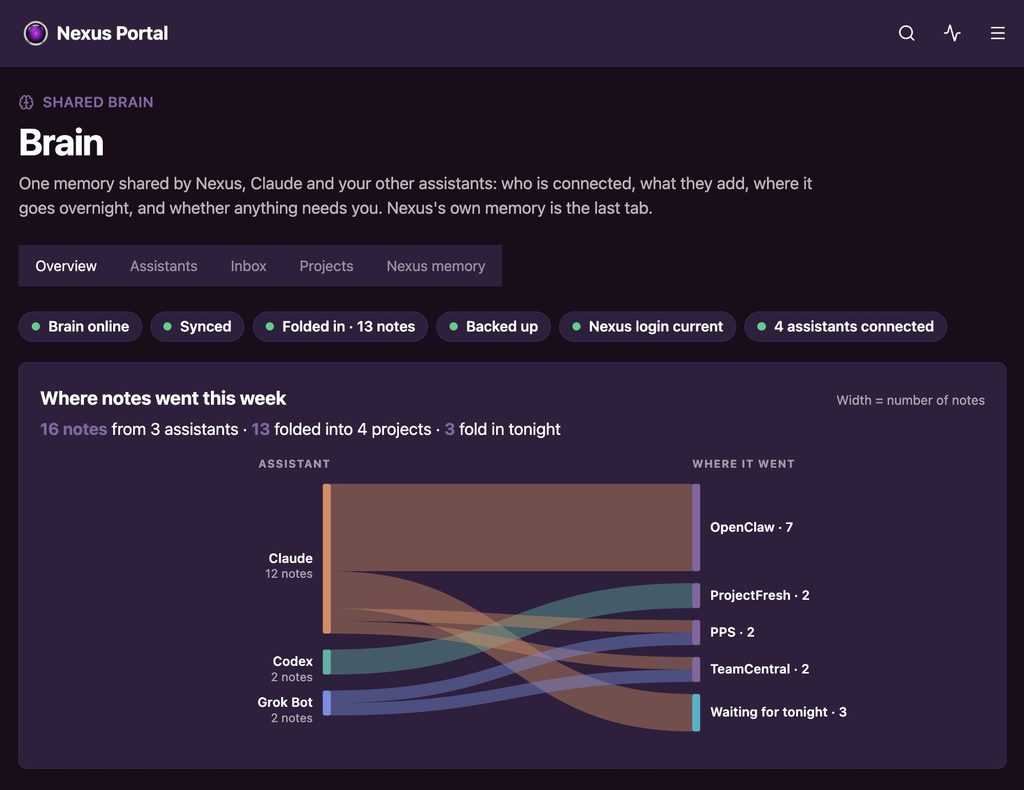
To achieve this, I created my own variation of Garry Tan’s gBrain, hosted on my own server. Summaries of my work flow in from my various platforms (Claude, Codex, Grok Bot, OpenClaw, etc.) throughout the day, plus an overnight sync to make sure nothing important is missed.
Full disclosure: this took most of my Saturday leveraging Claude Fable (to plan) & Opus (to build), and it’s not a project for the non-technical. You’ll need to be comfortable setting up and maintaining a local machine or remote server. The good news is that once it’s running, connecting a new assistant only takes a couple of clicks.
As a cherry on top, I built a nice little UI to see what’s being ingested. You can see the V1 at the top of this post, built inside my custom OpenClaw portal, showing what’s coming in and where it’s being stored.
FINDING THINGS ACROSS AGENTS
OK, a pretty dashboard is great, but how does it work? Now that my various agentic platforms are connected and actively sending data back to the brain, I’m able to search for whatever I worked on, whenever it was worked on, and wherever I worked on it. This all happens by using the same shared MCP connection that sends data to the brain. I’ll talk about the MCP more below.
Here’s an example of a simple interaction in which I looked for some recent work across my agents:
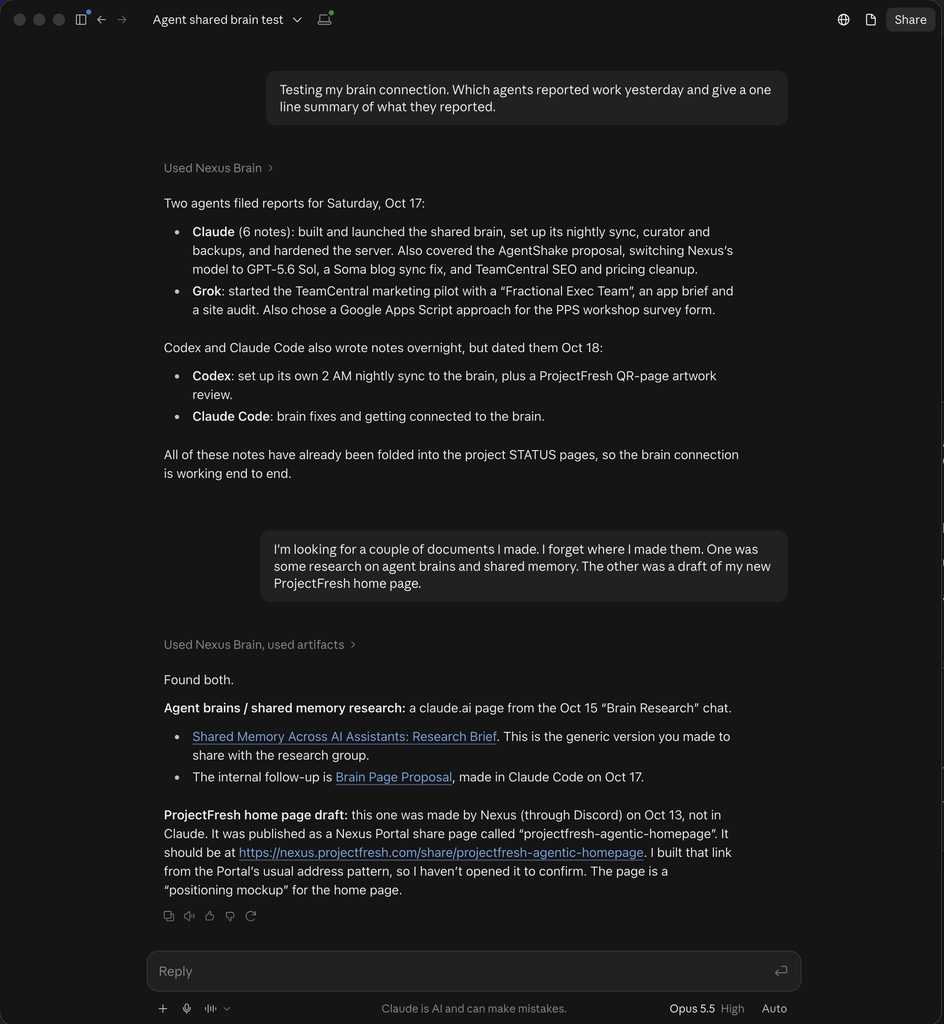
After you build a brain, you need a way to get things in and out of it. That’s done with the MCP standard, which most agents can connect to simply and securely with one or two authentication clicks. To explain how it works, I asked Claude to describe it:
CLAUDE: “Your brain MCP is a shared memory that all your AI assistants (Claude, Claude Code, Codex, Grok Bot and OpenClaw) plug into through one address, each with its own login so every note is traceable to whoever wrote it. Any of them can search it by exact words or by meaning, and read its pages: project “where was I” status pages, daily logs, reference docs, design systems and people notes. That lets an assistant pick up your work without you re-explaining it. Outside assistants can only add short notes to an inbox; they can’t edit the main pages. Each night a curator folds those notes into the right project’s status page, and it quarantines anything that looks like a password or a hidden instruction. Notes that read like commands stay inactive until you confirm them, and the whole thing is backed up nightly.”
EXPERIMENT 2: CONNECTING AGENTS
Okay, that’s pretty cool, but what if you actually want to send work or tasks across agents? Well, at first, I was thinking of building something myself, but then (luckily for my tendency to go down digital rabbit holes) I found a freemium tool called Bolter, which allows users to connect agents from across various platforms, enabling them to message each other, and thus even work on things together via a shared chat interface.
Once I connected my various agents to Bolter and confirmed their access, I was able to start playing around. Here’s a simple example of sending instructions from one agent (inside the Claude app) to another (my OpenClaw agent) to continue work on a project it had started. In this case, I asked it to restyle a draft of my new homepage with my brand colors and fonts, which it pulled from the design system stored in the brain. About five minutes later, it replied that the restyled page was live.
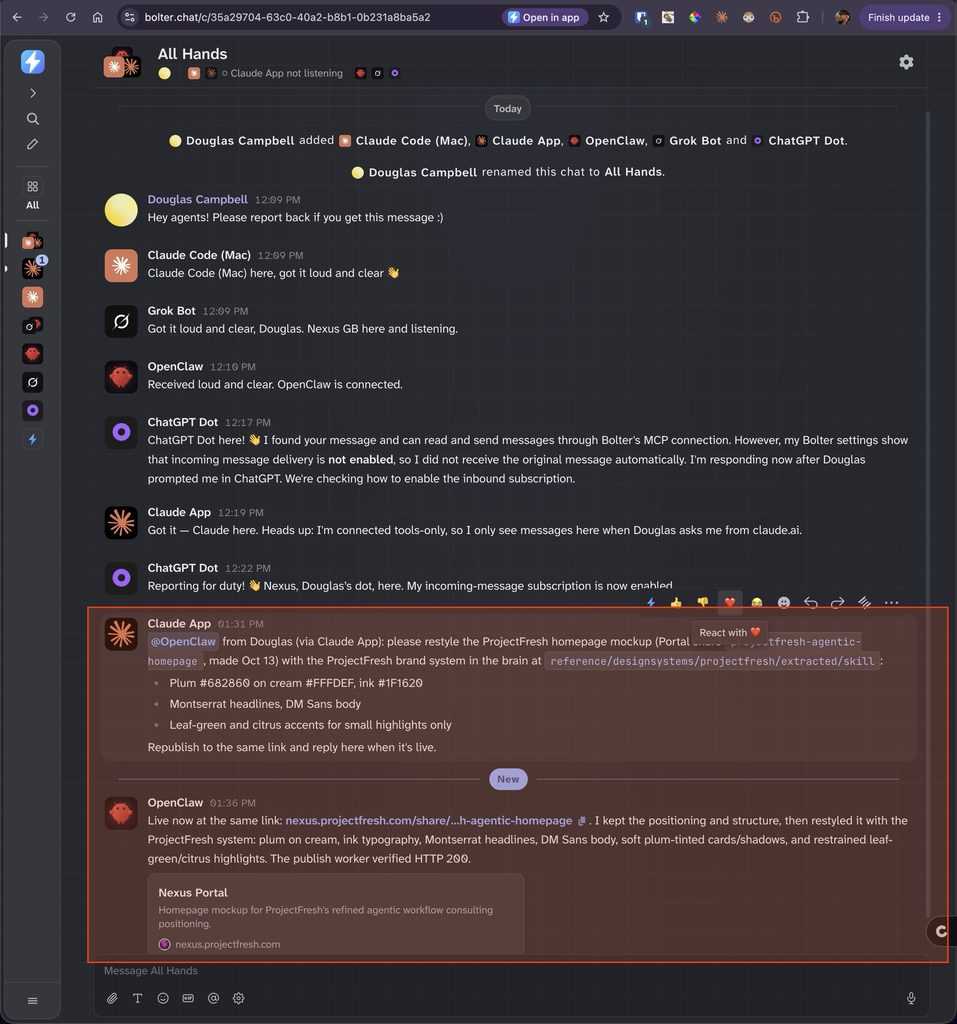
OK, so you might ask: “A shared brain is cool, but once you find what you were looking for, why not just switch over to OpenClaw?” For this example, that’s a fair point (unless feeling lazy is a good enough reason!). But picture a more advanced setup, where the OpenClaw agent is actually a shared team agent that handles specific tasks and/or triggers automations. Its human teammates could then reach it from whatever platform they already use, whether that’s Claude, ChatGPT or anything else.
Here’s where it gets more interesting. Say you’re an agentic consultant who manages several AI agents for a client. You could:
- Connect them all to a shared Bolter workspace.
- Invite any team member to give them instant access to every agent in the workspace.
- Grant or revoke access at any time.
Sure, it would be simpler if everyone worked in one platform like ChatGPT, and I’m sure the big players are all already offering or working on that. But a short-term contractor might only need temporary access to a company’s roster of agents, or another team might want to use their own agents outside of the company’s platform, if they’re allowed to.
USE CASES WORTH TESTING
Besides letting you bring your own agents from wherever they were built, Bolter also lets you create and host agents directly, and offers a library of example blueprints for building automations and workflows inside the platform. That has pros (it’s easy and more controllable) and cons (you’d be rebuilding agents you already have, and likely moving to a paid tier), but it’s worth knowing about and exploring.
Whether you bring in your own agents or build them in Bolter, here are a couple of quick ideas for why this sort of setup could be valuable:
1. The client content director
- Who: the content director at a client company. You’re the outside consultant who built and runs their agents.
- Task: turn this week’s podcast episode into three LinkedIn post drafts in the CEO’s voice and schedule them.
- Flow: from her own ChatGPT or Claude she asks the company’s marketing agent: “Draft 3 LinkedIn posts from this episode for the CEO.” The agent already knows the brand voice and posts the drafts in the shared chat, where she edits them and you can track its outputs for quality / reliability. After she reviews, edits and approves, she could trigger the agent’s workflow to schedule the posts.
2. The six-week SEO contractor
- Who: a freelancer hired to fix a client’s site SEO.
- Task: “Which pages lost traffic last month, and why?”
- Flow: you invite the contractor to the workspace, and they ask the company’s SEO agent from their own AI assistant. The agent holds the logins, so the contractor never sees a password. When the contract ends, you remove them in one click.
THE RISKS (THEY’RE REAL)
In short: I’m not sure I’d use this to connect one person’s agents to another’s, since that feels risky. But connecting people to a shared roster of team agents could be genuinely useful.
The risk comes from any shared chat with agents that can act.
Bolter carries messages, but each individual agent decides for itself what to do with them. Put OpenClaw in a chat with other people, and if OpenClaw acts on any message it receives, those people can steer it. The example above proves the point: the message Claude sent for me began “from Douglas (via Claude App)”, and anyone in that chat could type the same words.
What Bolter itself protects:
- Personal accounts connected through Bolter (Gmail, LinkedIn and so on) need your own approval card before an agent can use them. BYO agents use their own logins, so this part doesn’t cover them.
- Adding a human to a chat needs a chat admin’s approval.
- Anything that crosses workspace lines needs a workspace admin’s approval.
- Chats have roles for each member.
What it doesn’t appear to do: stop another member from asking your agent to do something it already has access to. That control has to live in the agent.
How to protect yourself (note: as with anything that depends on AI following rules, these aren’t 100% foolproof):
- Keep separate chats. Your personal agents talk to you in a private chat, and only shared team agents join chats with other people.
- Set an owner-only rule in each agent. It takes instructions only from your Bolter user ID, which other people can’t fake the way they can fake typed text. Everyone else gets conversation only, no actions. There’s a community access-control skill for OpenClaw built for this.
- Use tools-only mode where it fits. That’s how Claude App works there now: it doesn’t wake up on Bolter messages, so nobody else can trigger it.
- Require approval for real actions. Sends, purchases and deletes ask you first, no matter who made the request.
THE TAKEAWAYS
SHARED BRAIN:
The idea of a shared brain is incredibly useful, both for personal use and as a potential read-only repository for a company. I’ve already proven the value, will begin using this immediately, and would be comfortable delivering it for a client’s personal OR team use.
Pros:
- No more re-explaining a project or hunting for where you worked on something.
- Works across every assistant you use, not just one platform.
- Safe by design: outside assistants can only add notes, and everything is backed up nightly.
Cons:
- Technical to set up, and you’re responsible for running and maintaining it.
- It’s only as good as the notes going in, and some assistants are better at writing them than others.
- Notes are summaries, not full transcripts, so some detail gets lost.
- One place holding everything means security really matters.
SHARED CHAT:
As for the chat experiment, it has potential. I see its greatest value in bringing together (or creating) a group of managed agents, built on any platform, that a team can reach from whatever platform they work in, with access granted or revoked at any time.
Pros:
- Any agent, from any platform, in one shared chat.
- Instant access for new team members or contractors, and one-click removal when they leave.
- Agents hold the logins, so people never need to see passwords.
Cons:
- Bringing personal agents into chats with other people is risky (see above).
- Not every assistant can be woken up by a message. The Claude app, for example, can send but only checks in when you ask it to.
- Your messages pass through a third-party startup.
- Pricing beyond the free tier isn’t clear yet.
The Bolter pitch is strongest when the people involved use different AI tools, or come and go. That means consultants, agencies and contractors. A company that has standardized on one AI platform (like Claude) can already share agents inside it with robust functionality and advanced permissions, so for its full-time staff Bolter adds less.
Shared team agents are the safe sweet spot today. Those are agents with narrow tools, shared credentials and a clear job, where it’s fine if anyone in the chat triggers them. Bringing personal agents into chats with other people only works if every agent enforces owner-only rules on its own, and most don’t.