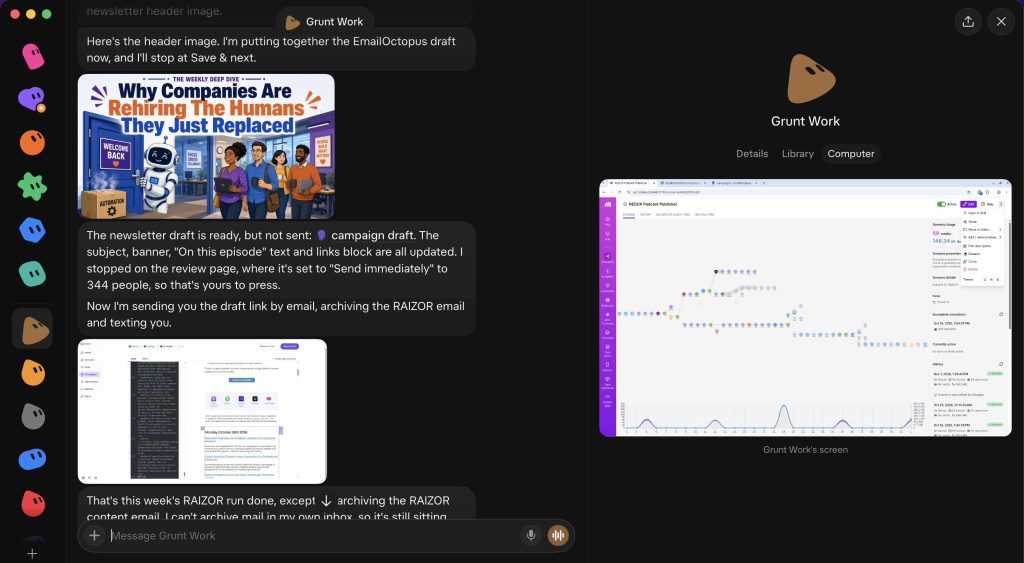
In the featured image, you’ll see part of the automation in which my helpful Grunt Work bot (on Grok Bot) created a newsletter banner, ran a Make.com automation, and built an email campaign for me.
Every Sunday I publish the RAIZOR Weekly Deep Dive, a podcast and newsletter that wraps up the week’s most important AI news. No matter how good my automation skills got, I just couldn’t close the gap to make it a hundred percent automated – because some apps just don’t allow for automation. But that time is over.
The problem
The content itself was already handled. My weekly content-scanning automation collects the AI news topics I flag all week. By Sunday afternoon it delivered the week’s news grouped by theme, with a custom prompt for the AI audio overview, and a block of links to all the stories, all in one email.
Then came the weekly grunt work: copy-pasting, waiting, file conversion, and clicking through different websites. Not all of them have API access, so I couldn’t just automate it the usual way. It ate 20 to 30 minutes of every Sunday. It was a mechanical process of the exact same steps every time. None of it needed human judgment – exactly the kind of work I’d rather not do.
What I did instead
I walked my Grok Bot assistant, which I named Grunt Work, through the whole process once, the same way I’d train a new team member. I wrote out the steps, flagged the gotchas (“if there’s already a file in that folder, stop and text me”), helped log it in to the tools it needed, and stood by while it did the first run.
It worked almost* flawlessly. I watched its screen it:
- Extracted the week’s news topics (and my custom prompt) from my weekly content wrap up email
- Logged into Google Notebook, created the notebook, and generated an audio overview with a custom prompt
- Downloaded the audio file and converted it to MP3 on its own computer
- Uploaded the file to a special Google Drive folder and copied the link
- Logged into Make.com, pasted the new file link into my custom publishing scenario, ran it, waited for half an hour, and confirmed the episode went live on Podbean and that social media posts were scheduled
- Grabbed the new episode’s description from the new podcast page
- Designed a fun custom banner image with the episode title in it
- Logged into EmailOctopus, duplicated my campaign template, and added the new title to the subject line, plus the banner, episode text and this week’s links
- Texted me via Twilio with a link to the draft, then when I gave it the thumbs up, it scheduled the campaign for the following morning.
*What went wrong (and why even that was awesome)
The first run wasn’t 100% perfect: I forgot to give it access to the Google Drive folder where it needed to drop the MP3! But that’s it, that was the ONLY problem. It just stopped, told me it needed help, I fixed it and it continued on its way. I just sat back and watched it work like a champ.
The result
Starting next week, the whole thing runs on its own. My content email lands in its own email inbox, Sunday around 2 PM. At 2:30 Grunt Work picks it up and runs every step. When the newsletter is ready, it texts me. I review the draft, reply “schedule it,” and I’m done.
I went from losing 20 to 30 minutes of my Sunday to spending a minute reviewing a draft. See the finished episodes at raizor.co/podcast.
The takeaway
The best things to hand to an AI assistant aren’t the clever creative tasks. They’re the repetitive, multi-tool, click-heavy chores you already know how to do but dread doing, especially the ones you can’t automate because the tools don’t have APIs. If you can write the steps down for a new hire, you can probably write them down for an assistant. Teach it once, supervise the first run, and let it take it from there.
What’s the Sunday chore you’d hand off first?